Turn every video callinto a live studio.
Professional virtual studio sets, live camera direction and your content on screen — running live inside Teams, Zoom, webinars and livestreams.
No rendering.Live production.
Schwercraft turns any video call or livestream into a professional broadcast studio. Open a studio set, join your Teams or Zoom call or start your stream, and your audience sees a real studio instead of a webcam.
There is no rendering and nothing to edit afterwards. You direct the camera live during the session from Schwercraft Director — the shortest path from webcam to broadcast.
One studio.
Every platform you already use.
Schwercraft registers as a camera source. Whatever your team already meets or streams in, the studio shows up there — no new tools to roll out.

Everything a broadcast studio has,
inside your video call.
Live, not rendered
Everything happens in real time during the call. Nothing to render, nothing to edit afterwards.
One license
One license, unlimited studios and unlimited live sessions for your whole team.
Enterprise-ready
Runs locally on your own hardware, no cloud black box. Built for secure, large-scale rollouts.
Your brand, your set
Customize the studio, swap backgrounds, and show your slides, videos or product live on the set screens.
Live camera direction
Tracking shots or manual steadycam control while you are live, for a human, broadcast feel.
No physical studio
No studio room, green screen or camera crew. Everything is virtual and runs from a single PC.
Direct your
broadcast, live.
Director puts you in full control during the session. Perform camera moves and adjust them in seconds, play your videos on the set screens, tune the 3D projection, or hide parts of the set entirely.
Use predefined or custom camera moves, or take manual ‘Steadycam’ control with a joystick or controller for a more human effect.
Create mood through the camera.
Predefined movements at different speeds, your own custom moves, or manual control — and you see the result in real time.
One PC.
A room full of studios.
Customizable virtual studios. Swap the background, put your slides or videos on the screens, and go live in seconds.
Hover a set to see it live. Every clip on this page was produced with Schwercraft.
Your studio, one layer above the call.
Pick the platform, load the set, direct the shot. Everything happens live while the meeting keeps running.
Ready to go live?
Show the smallest
detail, live.
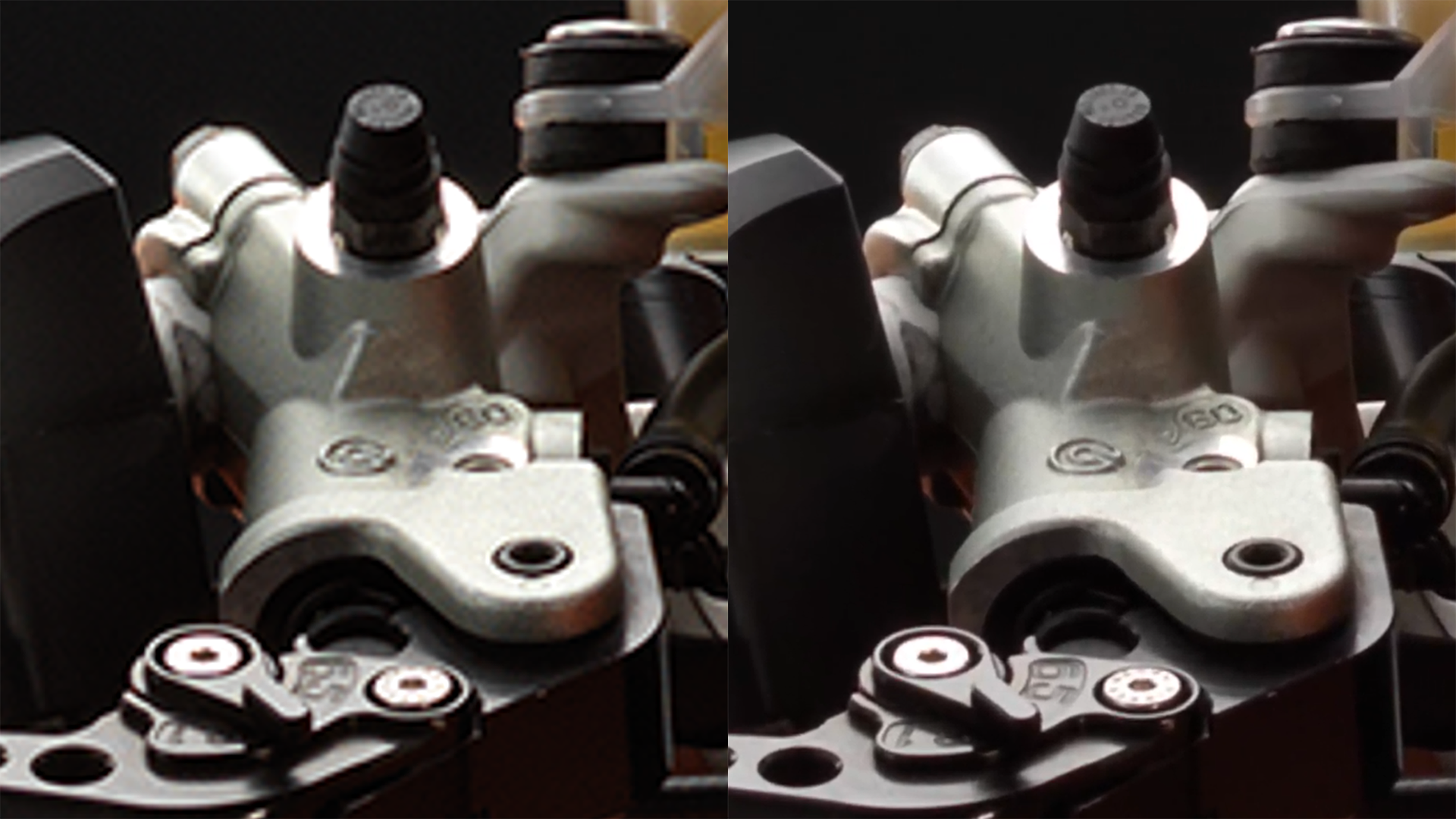
Push into a product, a document or a slide far past 400% and stay razor-sharp in 4K, live during the call. Remote viewers see every detail as if they were in the room.
And it holds up on modest bandwidth, so the detail survives the stream to every viewer.
- 400%+
- Zoom, still sharp
- 0.5 MB
- vs 14 MB for the same detail
One room reaches
every room.
Work is remote and hybrid. Town halls, webinars, training and customer calls all happen on camera — and a webcam in a home office simply does not match the message.
Schwercraft gives every one of those moments a professional studio, live, without a studio room, a camera crew or a production budget.
“It has an incredible effect on the creative process to see the result live. Very soon you start thinking differently.”
Ready. Set. Go.
From opening a studio to going live, in three steps.
Open
Open a studio set in Schwercraft and load the matching Director deck.
Adjust
Set your scene: pick the background, load your slides and videos, set your camera moves.
Go live
Join your Teams or Zoom call, or start your livestream, and direct the camera live.
Get Schwercraft
for your team.
License AR Studio per seat, or a full VR Studio for large productions. Live for Teams, Zoom, webinars and livestreams.
Schwercraft AR Studio
Billed 12 months in advance · €2,400 net / year
- Live for Teams, Zoom & OBS
- AR studio, unlimited sessions
- 4K broadcast quality
- One seat, a full live studio
Schwercraft VR Studio
For large studios & productions
- Full VR studio with virtual sets
- Multi-camera live direction
- Priority support & onboarding
- On-prem / self-hosted option
Schwercraft Custom Studio Set
Built by ramraver interactive
- A studio set built just for you
- Tailored to your video workflow
- Perfect for town halls & webinars
- Direct support from our team
Prefer the full shop? Open the Schwercraft store
Let’s build your studio.
Tell us how your team communicates on camera, and we’ll bring a professional live studio to your calls, webinars and livestreams. Custom studio sets start at €1,000.
All animations on this website were made with Schwercraft software by ramraver interactive.